



Manager User Interface
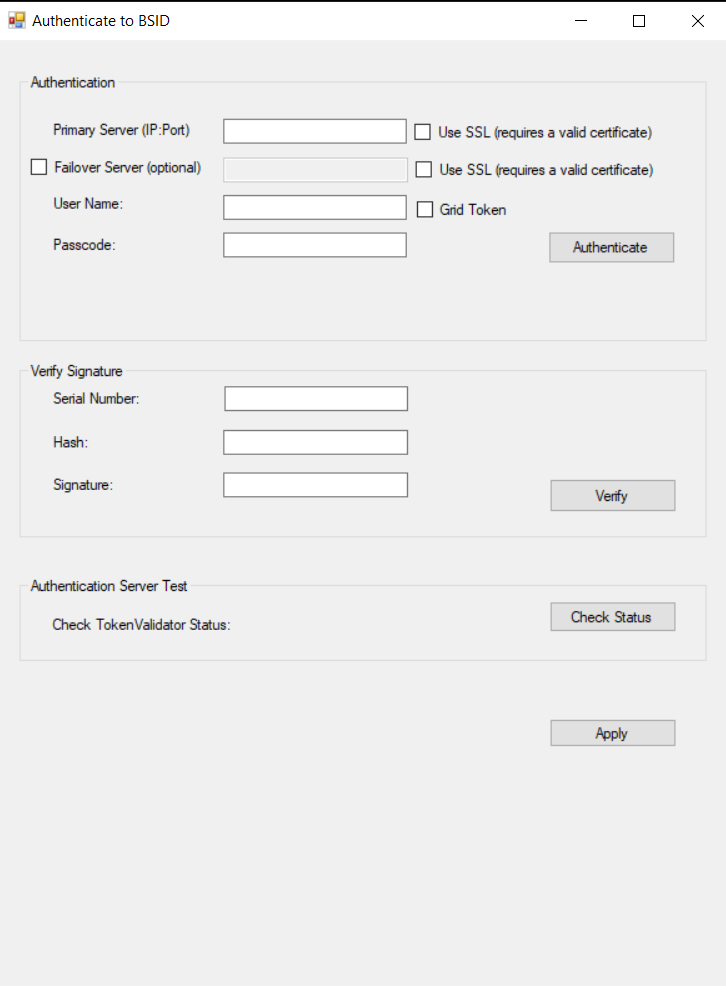
The Manager User Interface is used to verify the authentication function. It is defined on the following two frameworks:
-
.NET Framework 4.8.1 (apiTestClient) — To open the Manager User Interface, navigate to the following path and run the
apiTestClient.exefile:Thales\DotNetAPI\apiTestClient\bin\Release -
.NET 10 (apiTestClientDotNetCore) — To open the Manager User Interface, navigate to the following path and run the
APITestClientDotNetCore.exefile:Thales\DotNetAPI\APITestClientDotNetCore\bin\Release
The Manager User Interface window is displayed:
Authentication
To connect primary and failover server(s), perform the following steps:
-
Enter the following fields:
- Primary Server (IP:Port) — Select Use SSL, if required.
- Failover server (optional) — Select Use SSL, if required.
-
Click Apply.
-
The
ServiceURLandOptionalSecondaryServiceURLkeys are updated under the following registry node:HKEY_LOCAL_MACHINE\SOFTWARE\Thales\BSIDAPI
To verify authentication, perform the following steps:
-
Enter the following fields:
- User Name
- Passcode
- Grid Token fields
Note
Grid Token fields (GridImage and Base64GridImage) are added to test the
getGridSureImageorgetGridSureImageAsBase64methods conveniently. -
Click Authenticate.
A message is displayed indicating if authentication succeeded or failed.
Verify signature
To verify a signature, perform the following steps:
-
Enter the following fields:
- Serial Number
- Hash
- Signature
-
Click Verify.
A message is displayed indicating if signature verification succeeded or failed.
Authentication Server Test
To test TokenValidator status, click Check Status.
A message is displayed indicating if the SAS server is running or not.

