



View Job History
Use the Job History section to see which operations have been performed on a table, what is the status of the operations, and when the operation was initiated. This field also provides a way to handle operations that have not completed either because the operation failed or was cancelled. From the Job History section, such tables can be restored to its previous state or the cancelled operations can be continued.
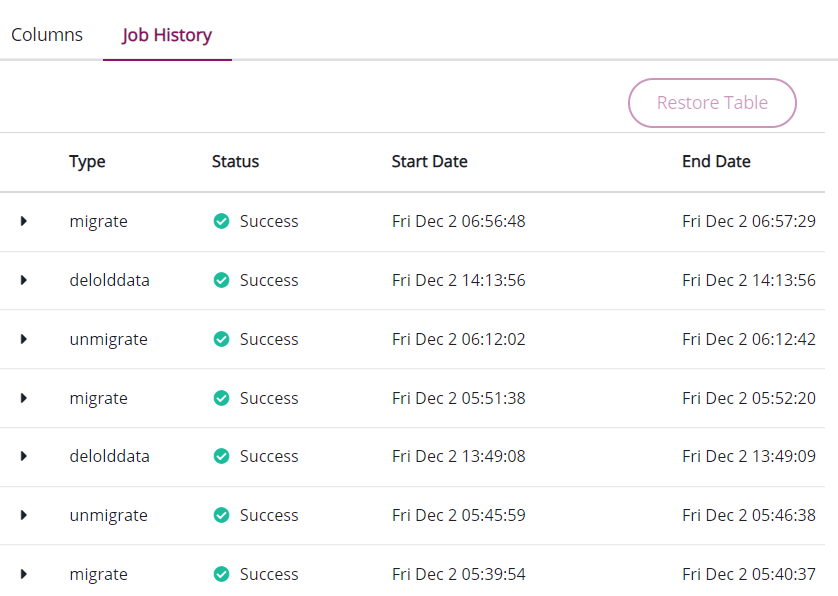
To view the list of jobs performed on a table:
-
Log on to the CipherTrust Manager GUI.
-
Click Database Protection to open the application. The Databases screen displays the list of existing database connections, if any.
-
Click the desired database connection.
-
Click the Tables link.
-
On the Authorize Database screen, enter the Database Password to access the tables.
-
Under the Tables with Encrypted Columns section, click the table for which you want to view the Job History.
-
Click Job History.
The Job History section contains the following components:
Components Details Type Type of operations performed on the table. Status Status of the operation. Possible options are:
— success: The job ran successfully.
— restored: The data was restored to its previous state.
— cancelled: The job was cancelled by the user.
— failure: The job did not complete successfully.
— processing: The job is currently processing.Start Date Time when the operaton began. End Date Time when the operation ended. -
On the Job History section, click to expand the
 icon to view the details of the desired operation. The example below shows the details of a successful migration.
Component Description Operation Name of the operation. Status Status of the operation Columns Affected Name of the columns that were affetcted. Start Time Time when the operaton began. End Time Time when the operation ended. Rows Modified Number of rows that were successfully operated upon before the process ended.